







Prerequisites
Before you begin, ensure you have the following:
- Docker & Docker Compose: DockFlare is a Docker-based application, so you'll need both Docker and Docker Compose installed on your system.
- A Cloudflare Account: You'll need a Cloudflare account to manage your domains and create API tokens.
- Your Cloudflare Account ID: You can find your Account ID in the Cloudflare dashboard.
- The Zone ID: Each domain in Cloudflare has a unique Zone ID that you will need.
-
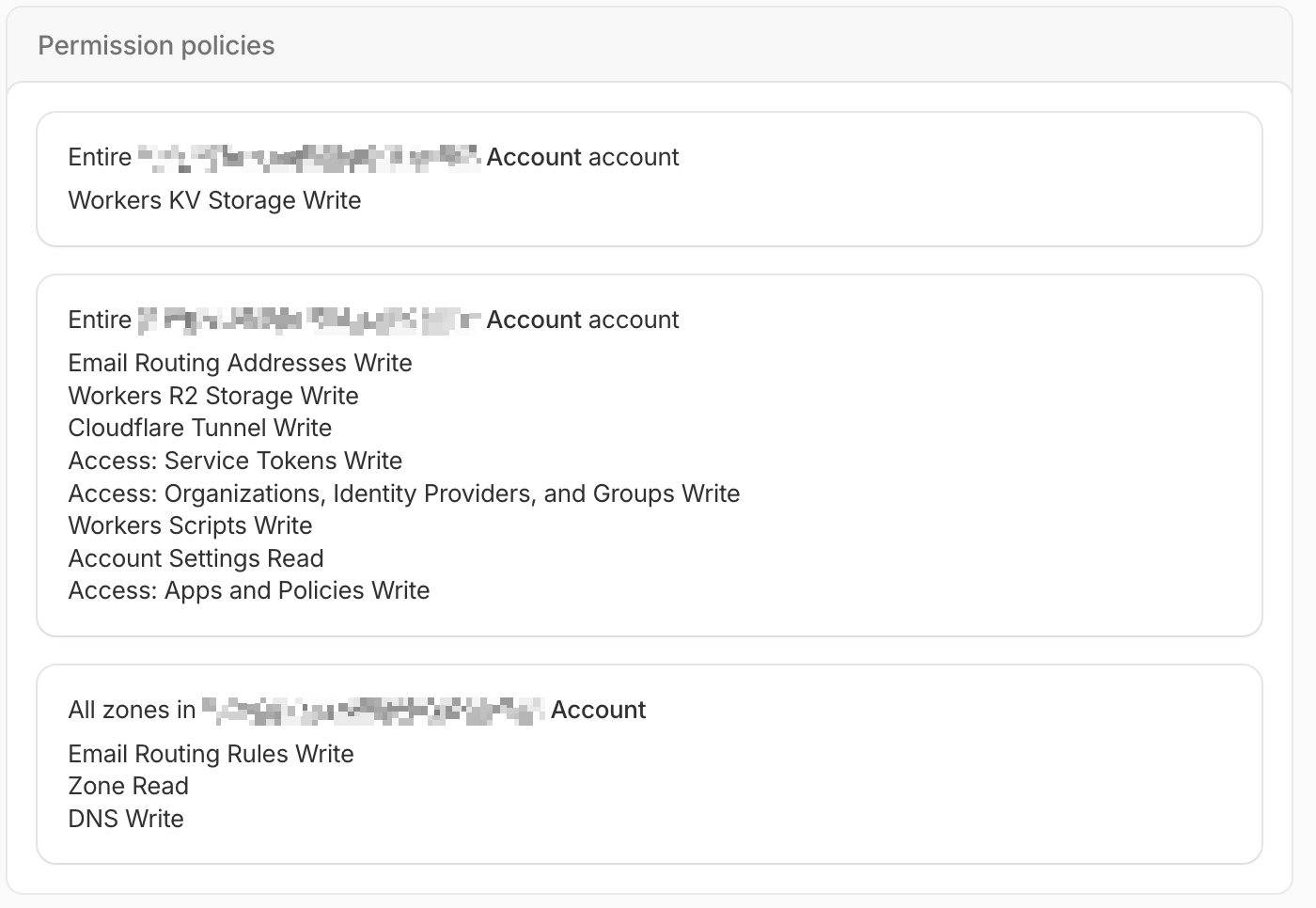
A Cloudflare API Token: Create a Cloudflare API token with the following mandatory permissions:
Account:Cloudflare Tunnel:WriteAccount:Account Settings:ReadAccount:Access: Apps and Policies:WriteAccount:Access: Organizations, Identity Providers, and Groups:WriteAccount:Access: Service Tokens:WriteZone:Zone:ReadZone:DNS:Write
For optional DockFlare Email features, add these additional permissions:
*Workers Scripts:Write
*Workers KV Storage:Write
*Workers R2 Storage:Write
*Email Routing Addresses:Write
*Email Routing Rules:Write